

Email encryption for small business protects your business messages from unauthorised access, helping you stay secure in an era of increasing cyber threats. Every week, another small business discovers their customer data has been stolen through intercepted emails. The reality? Hackers target small businesses because they often have weaker defences than large corporations. Your standard email isn’t nearly as secure as you might think.
The good news is that email encryption for small businesses has become incredibly accessible. You don’t need an IT department or technical expertise to protect your communications. Modern encrypted email services work just like regular email, but with powerful protection built in. With the right service, setup takes less than an hour, and you can keep your existing email address in most cases. Free options are available, but paid plans offer advanced features for growing businesses. Mailfence for Business includes encrypted email, secure calendars, and documents.
This guide walks you through everything about securing your business emails. You’ll learn what encryption actually does, compare the best encrypted email services available, and get step-by-step setup instructions. We’ll also show you how to avoid common mistakes that leave businesses vulnerable.
What is email encryption?
Email encryption converts your messages into unreadable code that only the intended recipient can decode. Think of it like sending a letter in a locked box where only the recipient has the key. Without that key, anyone who intercepts your email sees nothing but scrambled text.
The process happens automatically once you set it up. When you hit send, your email gets encrypted on your device. It travels across the internet as coded text. Only when it reaches your recipient does it get decoded back into readable form. Learn more about end-to-end encryption and how it protects your messages.
This protects the sensitive parts of your email, such as message content and attachments. Depending on the provider and protocol, some metadata like subject lines or sender/recipient details may still be visible to mail servers for routing. Think of encryption as putting your conversation in a locked box: outsiders can see that a message was sent and to whom, but not what it says inside.
What is email encryption for small business?
Email encryption for small business goes beyond personal privacy needs. It protects customer data, financial information, contracts, and strategic communications. Your business emails contain sensitive details that competitors or criminals would love to access.
Unlike personal encryption, business solutions need to work for entire teams. They must integrate with your existing workflows without disrupting productivity. The best solutions let employees send encrypted emails as easily as regular ones.
Small businesses often handle the same sensitive data as large corporations. Customer credit card numbers, health information, legal documents, and trade secrets all flow through email. The difference is that small businesses typically lack dedicated IT security staff. That’s why adhering to best practices of business email security is essential for companies of all sizes.
When should you encrypt an email message?
You should encrypt emails whenever they contain sensitive or confidential information. This includes messages with customer personal data, payment details, or account numbers. Any email with passwords, login credentials, or security codes needs encryption too.
Legal documents, contracts, and proposals should always be encrypted. The same goes for employee information like salary details, performance reviews, or medical records. If you’re discussing business strategy, new products, or pricing, encryption keeps competitors from snooping.
Here’s a simple rule: if you wouldn’t want that email posted publicly online, encrypt it. Many businesses choose to encrypt all emails by default. This removes the guesswork and ensures nothing sensitive slips through unprotected.
Why is email encryption necessary for small businesses?
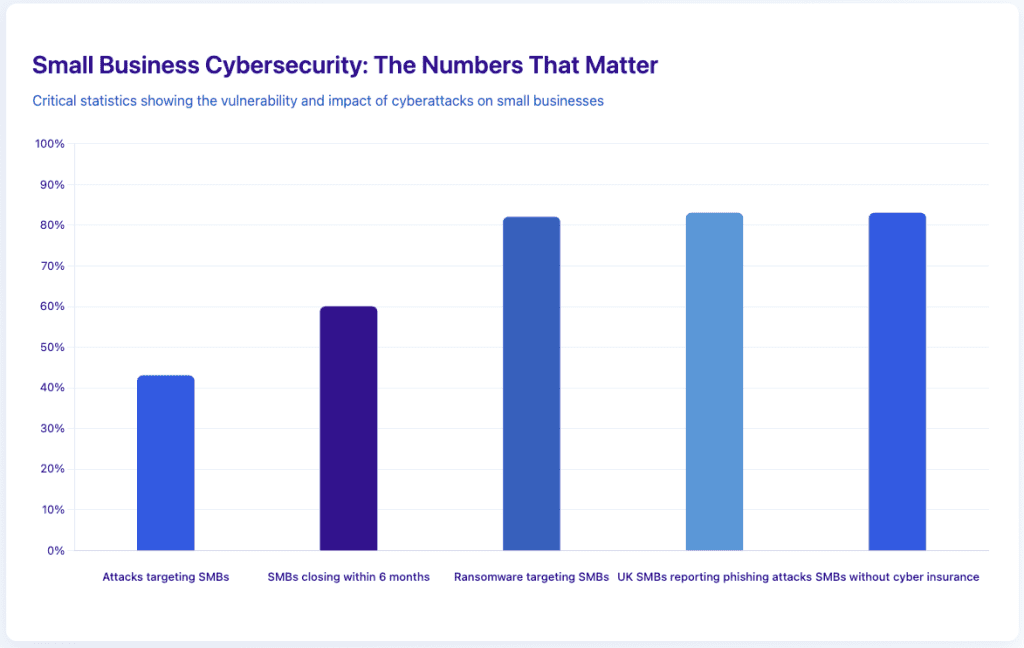
Small businesses experience 43 per cent of all cyberattacks, according to the Verizon 2024 Data Breach Investigations Report (DBIR). These attacks cost an average of $150,000 per incident for smaller breaches, though the IBM Cost of a Data Breach Report 2024 shows the global average for all breaches reaches $3.4 million. Most small businesses can’t absorb even the lower figure. Many close within six months of a major breach, according to the National Cyber Security Alliance.
Your customers trust you with their information. A single data breach destroys that trust instantly. News of breaches spreads fast on social media. Your reputation can take years to rebuild, if it recovers at all.
Regulations now require encryption in many industries. HIPAA mandates it for health information. GDPR requires it for European customer data, while UK businesses must also comply with the UK GDPR post-Brexit, which maintains similar requirements but with specific UK Information Commissioner’s Office (ICO) guidance. Financial services face similar requirements under PCI DSS. Non-compliance brings hefty fines on top of breach costs.
Comparison: cost of data breach vs email encryption
| Factor | Data breach cost | Annual encryption cost |
|---|---|---|
| Direct costs | $40,000-$150,000* | $45-$450 per user |
| Recovery time | 2-6 months | 1 hour setup |
| Customer loss | 20-40%** | 0% |
| Legal fees | $15,000-$75,000 | $0 |
| Reputation damage | Severe, long-lasting | None |
| Compliance fines | Up to $40,000*** | $0 |
*For smaller incidents; enterprise breaches average $3.4M (IBM 2024) **Ponemon Institute SMB Cyber Resilience Study 2024 ***UK ICO can fine up to £17.5M or 4% of global turnover
What’s the difference between email encryption and email security for small business?
Email security covers all the ways you protect your email system. This includes spam filters, antivirus scanning, phishing detection, and user authentication. Think of it as your complete defence system against email threats.
Email encryption is one specific part of that security system. It protects the content of your messages during transmission and storage. While other security measures stop bad emails from reaching you, encryption protects your own emails from being read by others.
You need both for complete protection. Security features stop incoming attacks. Encryption protects your outgoing sensitive information. Together, they create a robust shield around your email communications.
“Small businesses often think they’re too small to be targeted, but that’s exactly what makes them attractive to cybercriminals. Email encryption is no longer a luxury – it’s a fundamental business protection, just like locking your office door.” – Patrick De Schutter, Co-founder Mailfence
Security vs encryption: quick reference
- Email security: Blocks spam, viruses, and phishing attempts. Protects your inbox.
- Email encryption: Scrambles your message content. Protects your sent emails.
- Both together: Complete protection for all email communications.
Key benefits of using an encrypted email service for small business
Privacy protection stands as the most obvious benefit. Your business conversations stay between you and your recipients. Competitors can’t spy on your strategies. Criminals can’t steal customer information from intercepted emails.
Compliance becomes much simpler with encryption in place. You automatically meet the email security requirements of most regulations. This saves you from complicated compliance processes and potential fines. Your lawyer and accountant will thank you.
Customer confidence increases when they know you take security seriously. Many clients now ask about encryption before doing business.
Your liability decreases significantly with proper encryption. If a breach occurs despite your precautions, encryption shows you took reasonable steps to protect data. This can reduce legal exposure and insurance claims. It demonstrates professionalism and responsibility.
You gain a competitive edge over businesses that don’t encrypt. Security-aware customers actively choose protected providers. Government contracts often require encrypted communications. You qualify for opportunities that non-encrypted competitors can’t pursue.
Dedicated encrypted email services for small business
These are standalone platforms built from the ground up for privacy and security. They offer end-to-end encryption, secure document sharing, and often additional privacy features. They are best for businesses prioritising maximum security and privacy.
- Mailfence: Offers a comprehensive Productivity Suite with end-to-end encryption, secure calendars, and documents.
- Proton Mail: Renowned for strong privacy and open-source transparency.
- Tuta: Focuses on simplicity and privacy, with automatic encryption and open-source code.
- Hushmail: Specialises in secure email for healthcare and legal sectors, with built-in compliance features.
- Zoho Mail: Built-in encryption and DLP (Data Loss Prevention).
For a detailed comparison of other leading providers, see our complete guide on secure business email hosting. That analysis covers providers with full productivity suites and integrated collaboration tools.
Integration and add-on solutions
These solutions add encryption to your existing email platform (Gmail, Outlook, etc.) via plugins, extensions, or gateways. They are best for businesses that want to keep their current email address and workflow.
- Virtru: Adds encryption to Gmail and Outlook.
- FlowCrypt: Integrates PGP encryption into Gmail.
- EncryptTitan: Offers TLS-Verify encryption and secure portals.
- Zix: Automated policy-based encryption and DLP.
- Paubox: Frictionless encryption for healthcare and finance.
Specialised encryption solutions for small business
| Provider | Best for | Key feature | Category |
|---|---|---|---|
| Mailfence | Privacy, integrated business tools | End-to-end encryption | Dedicated encrypted email |
| Proton Mail | Privacy | End-to-end encryption | Dedicated encrypted email |
| Tuta | Privacy | Automatic encryption | Dedicated encrypted email |
| Hushmail | Healthcare/Legal | HIPAA compliant | Dedicated encrypted email |
| Zoho Mail | Integrated business tools | Encryption, DLP, cloud | Dedicated encrypted email |
| Virtru | Gmail/Outlook users | One-click encryption | Integration/add-on |
| FlowCrypt | Google Workspace | PGP for Gmail | Integration/add-on |
| EncryptTitan | Mixed recipients | Automatic TLS | Integration/add-on |
| Zix | Compliance, DLP | Automated policy-based | Integration/add-on |
| Paubox | Healthcare, Finance | Frictionless, cloud storage | Integration/add-on |
Enterprise vs small business solutions
Enterprise encryption tools like Microsoft Purview or Symantec require complicated IT infrastructure. They assume you have dedicated IT staff and enterprise email servers. Setup can take weeks and cost thousands in consulting fees.
Small business solutions work differently. They’re designed for quick setup without technical expertise. You can usually start sending encrypted emails in an hour. Pricing scales with your team size rather than requiring huge upfront investments.
The features also match small business needs better. You get straightforward encryption without overwhelming complexity. Support teams understand small business challenges. Updates happen automatically without disrupting your work.
How to choose an encrypted email service for your small business
Start by listing your must-have features. Do you need calendar integration? How much storage per user? Must it work with your existing email client? Knowing your requirements helps narrow options quickly.
Consider your team’s technical comfort level. Some services require more setup than others. If your team isn’t tech-savvy, prioritise user-friendly options. The best encryption is the one your team will actually use.
Think about growth. Choosing a service that scales with you avoids painful migrations later. Check how pricing changes as you add users. Some providers offer better volume discounts than others.
Questions to ask before choosing
How many team members need encrypted email?
This affects both cost and which providers make sense. Some offer better pricing for larger teams. Others specialise in small team features.
What compliance requirements do you face?
Healthcare businesses need HIPAA compliance. Financial services have different requirements. Make sure your chosen provider meets your industry’s standards.
How important is customer support?
If you’ll need help during setup or ongoing use, investigate support quality. Read reviews focusing on support experiences. Test response times before committing.
Will you need integration with other tools?
Some providers offer APIs, Outlook/Gmail plugins, or IMAP/SMTP support so you can keep using your existing email client. Others work only as standalone web or mobile apps. Consider how encryption will integrate with your current mail setup and broader technology stack.
Do I need to change my existing email address for encryption?
You don’t always need a new email address for encryption. Many encryption services work with your existing email through plugins or apps. This lets you keep your established business email while adding encryption capabilities.
Services like Virtru and FlowCrypt add encryption to Gmail or Outlook. They install as browser extensions or mobile apps. Your email address stays the same, but you gain encryption features. This works well for businesses already invested in Google Workspace or Microsoft 365.
However, switching to a dedicated encrypted email provider offers stronger protection. Mailfence offers an excellent middle ground here. You can keep using your existing business domain while gaining full encryption benefits. Here’s how it works:
If you already have a Mailfence account, you keep your @mailfence.com address and add your custom domain as an extra. You can create aliases like you@yourdomain.com. Both addresses coexist on the same account, giving you flexibility during transition.
For your custom domain, you point the domain’s MX, SPF, and DKIM records to Mailfence. You can also set up DMARC for extra protection. Then you create custom domain addresses as aliases or user accounts through the Admin console.
Mailfence uses OpenPGP encryption for all messages. OpenPGP is an open-source encryption standard based on PGP (Pretty Good Privacy), while S/MIME (Secure/Multipurpose Internet Mail Extensions) uses a certificate-based approach. The key difference: OpenPGP lets you generate and manage your own keys, giving you full control, while S/MIME requires certificates from a Certificate Authority, adding cost and complexity. OpenPGP works with other encrypted email services too, so you’re not locked into one provider’s ecosystem.
What is the best free email encryption service?
Free email encryption services offer real protection without any cost. Mailfence offers 1GB free storage on emails and documents. It lets you test Mailfence’s full Productivity Suite. This helps you evaluate if their paid plans match your business needs before committing. Check out our comparison of the best secure email providers for more options.
Proton Mail’s free tier gives you 1GB storage and 150 messages per day. That’s enough for freelancers or very small businesses just starting out.
Tuta gives 1GB free storage with unlimited emails. The interface stays simple and encryption works automatically.
How about encryption add-ons? Most browser-based encryption add-ons are cumbersome or unusable on mobile devices (with a couple of exceptions such as the FlowCrypt app). Mobile browsers limit extension capabilities for security and performance, and Apple bans most third-party crypto extensions on iOS.
Although free tiers for add-ons exist, they are typically limited to basic encryption, lack mobile support, and often require paid upgrades for full functionality. For mobile, dedicated privacy apps like Mailfence and Proton offer better free options.
Hidden costs to consider
- Free tiers often limit storage to 1GB or less; regular attachment exchanges fill this quickly.
- Upgrading to paid plans is usually necessary as your business grows – plan for this expense in your budget.
- Most free plans restrict custom domain use, giving you an @provider.com address instead of @yourbusiness.com.
- Using a provider domain looks less professional to clients; custom domains usually require at least the basic paid tier.
- Support typically prioritises paid customers; free users may wait days for responses.
- For business operations, quick support matters—consider this when choosing between free and paid options.
How does email encryption for small business work with Gmail and Outlook?
Gmail offers basic encryption through S/MIME, but only for paid Workspace accounts. Setup requires IT knowledge and both sender and recipient must have certificates. Most small businesses find third-party solutions easier.
Outlook includes encryption options in Microsoft 365 business plans. Recipients without Outlook must use a web portal to read encrypted messages. This extra step can frustrate customers unfamiliar with the process.
Third-party add-ons simplify encryption for both platforms. They handle the complicated parts automatically. Recipients can usually read encrypted messages without special software. This balances security with convenience.
How to encrypt an email: a step-by-step guide
Step 1: Assess your encryption needs
Identify what types of sensitive data you handle. Count how many team members need encryption. Determine your budget and compliance requirements. This groundwork ensures you choose the right solution.
Step 2: Choose your encryption method
Decide between a full encrypted email service or an add-on for existing email. Full services offer better protection but require switching providers. Add-ons are quicker to implement but may have limitations.
Consider symmetric encryption for password-protected messages to non-encrypted recipients.
Step 3: Select a provider
Compare providers against your requirements list. Sign up for free trials when available. Test the interface and features with your team. Make sure everyone finds it usable before committing.
Step 4: Set up your account
Follow the provider’s setup wizard. Most walk you through the process step-by-step. Configure your custom domain if using one. Set up email signatures and automatic encryption rules.
Step 5: Configure settings
Adjust encryption settings to match your security needs. Set up two-factor authentication for added protection. Configure backup codes in case you lose access. Enable automatic encryption for sensitive keywords.
Step 6: Test with team members
Send test emails between team members first. Verify encryption works correctly. Check that attachments encrypt properly. Make sure everyone can read encrypted messages without issues.
Step 7: Train your staff
Schedule a brief training session for all users. Show them how to send encrypted emails. Explain when encryption is required. Create a simple reference guide for common tasks.
Step 8: Deploy to customers
Inform customers about your new encrypted communication option. Send test messages to key clients first. Gather feedback and adjust settings if needed. Gradually expand usage as comfort grows.
Common setup mistakes to avoid
- Don’t skip the testing phase. Always verify encryption works before sending sensitive data. A misconfigured system might appear to work while leaving emails unprotected. Test thoroughly with non-sensitive content first.
- Avoid choosing based on price alone. The cheapest option might lack critical features you need. Consider the total value including support, features, and reliability. A slightly higher price often brings much better service.
- Don’t forget about mobile devices. Make sure your chosen solution works on phones and tablets. Many business emails get sent from mobile devices. Your encryption must work everywhere your team works. The Mailfence mobile app includes full encryption features for iOS and Android.
Best practices for email encryption for small businesses
1. Make encryption the default, not the exception.
Configure your system to encrypt all emails automatically. This prevents accidentally sending sensitive information unprotected. Users can disable encryption for non-sensitive messages if needed.
2. Keep encryption keys backed up securely.
Store backup codes in a safe place. Consider using a password manager for team key management. Lost keys mean lost access to encrypted messages forever. Learn more about user data security best practices.
3. Regular training keeps everyone sharp.
Schedule quarterly reminders about encryption importance. Share examples of breaches at similar businesses. Update training when you add new team members or features.
4. Monitor usage to ensure adoption.
Most services show encryption statistics. If usage drops, investigate why. Address any usability issues quickly to maintain protection levels.
5. Support remote work and hybrid models.
With more teams working remotely, ensure your encryption solution works seamlessly on cloud-based platforms and mobile devices. This allows employees to send and receive encrypted emails securely, no matter where they are.
Key takeaways: email encryption for small business
1. Email encryption for small business protects sensitive data from interception and theft
2. You can implement encryption without changing email addresses using add-on tools or providers that support custom domains
3. Free services work for very small teams, but paid plans offer better business features
4. Setup takes about an hour with modern encrypted email services
5. Encryption costs far less than dealing with a data breach
6. Training your team ensures consistent protection across all communications
Final thoughts on securing your business emails
Protecting your business emails isn’t optional anymore. The risks are too high and the solutions too accessible to ignore encryption. Your customers expect it, regulations increasingly require it, and your business depends on it.
The good news? Getting started has never been easier. Modern encrypted email services like Mailfence combine powerful protection with familiar interfaces. You can secure your communications without disrupting your workflow. If you want to hear more privacy-related content, follow our newsletter!
FAQ about email encryption for small business
How to choose the right encrypted email service for your business
Consider your team size, budget, and technical expertise when choosing. Look for services with automatic encryption, good customer support, and compliance with your industry regulations. Test free trials before committing. The right service balances security, usability, and cost for your specific situation.
What is the most secure email for a small business?
Mailfence and Proton Mail offer the strongest security for small businesses. Both use end-to-end encryption and operate under strict privacy laws. Mailfence adds integrated workspaces (such as secure documents, calendars, group collaboration features) and native support for standard protocols, allowing users to keep using the mail clients they are used to. Proton Mail offers slightly stronger encryption options. Either offers excellent protection for sensitive business communications. For businesses requiring digital signatures, Mailfence provides native support.
What is the best email encryption software?
The best email encryption software depends on your existing setup. For standalone solutions, Mailfence and Proton Mail excel. For Gmail users, FlowCrypt works smoothly. Outlook users might prefer Virtru. Each offers strong encryption with different strengths for specific business needs and workflows.
Is Mailfence better than Gmail?
Mailfence prioritises privacy, while Gmail prioritises features and integration. Mailfence encrypts everything and doesn't scan your emails for data. Gmail offers more third-party integrations and collaboration features. Mailfence works better for privacy-conscious businesses. Gmail suits businesses prioritising Google Workspace integration over maximum privacy. For a detailed comparison, check our full Gmail vs Mailfence guide.
Is Gmail for business encrypted?
Gmail uses TLS encryption for emails in transit between servers. However, Google can still read your emails for various purposes. True end-to-end encryption requires additional tools or Google Workspace Enterprise with S/MIME configuration. Standard Gmail for business doesn't offer the encryption level most sensitive business data requires.


