

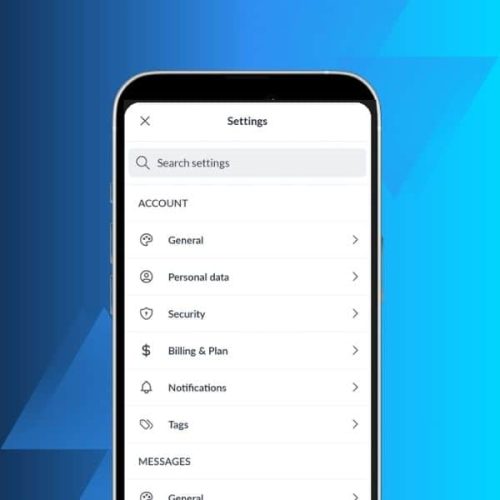
Great news for Mailfence mobile users: you can now access your settings directly from the app.
No more switching to your computer for quick adjustments. This update brings key settings to your fingertips, along with four new languages and improved calendar functionality.
Download the latest version on the Google PlayStore here or on the AppStore here.
Here’s what’s new:
- Settings for account, messages, calendar, contacts, and documents
- German, Italian, Spanish, and Portuguese language support
- Better handling of recurring calendar events
- Various bug fixes and improvements
Let’s take a closer look.
Mailfence mobile app settings: what’s new?
Until now, adjusting your Mailfence settings meant logging in from a desktop browser.
With this update, you can manage your most important settings right from your phone or tablet.
Tap the gear icon in the bottom left corner of your sidebar to access the new Settings screen.

You’ll find a clean, searchable interface organised by category. Need to find something specific? Just use the search bar at the top.
What settings can you manage on mobile?
The mobile app now includes settings across five main areas.
You can adjust your account, messages, calendar, contacts, and documents – all without opening a browser.

Here’s what’s available:
Account settings:
- General preferences – set your language, time zone, and date format, opt in or out of our Privacy Newsletter
- Personal data – update your name and profile information
- Security options – change your password, recovery email and manage two-factor authentication
- Billing and plan – view your subscription and upgrade if needed
- Notifications – control push notifications and email alerts
- Tags – create and manage colour-coded tags to organise your emails, contacts, documents and calendar
Message settings:
- General display options – choose how your emails appear in your inbox
- Folders – create, rename, or delete email folders
- Signatures – set up different signatures for each email identity
- Aliases – manage your email aliases and alternate addresses
- Short Domain – enable shorter @mf.me email addresses
- Away message – set up automatic out-of-office replies
- Filters and rules – whitelist domains, automatically sort incoming emails into folders, manage rules
Calendar, contacts, and document settings
Scroll down and you’ll find settings for your calendar, contacts, and documents too.
Calendar settings:
- Display preferences – set your default view, color and first day of the week
- Other calendars – connect and view/manage external calendars
Contacts settings:
- Display options – choose how your contacts are sorted and displayed
Documents settings:
- Cache management – clear cached files to free up storage space on your mobile device
These settings sync with your web account. Any changes you make on mobile will appear when you log in from your computer.
4 new languages now supported
We’re excited to welcome more users in their native language!
The Mailfence mobile app is now available in German, Italian, Spanish, and Portuguese.
🇩🇪 Willkommen, 🇮🇹 Benvenuti, 🇪🇸 Bienvenidos, 🇧🇷Bem-vindos to our new language communities!
To switch your language, head to your Account Settings and select your preferred option.
This brings our mobile app in line with the [language options available on the web platform].
Improved recurring event handling
Managing recurring events in your Mailfence Calendar just got easier.
You can now delete recurring events one at a time, or remove all instances at once.

Previously, handling recurring events on mobile could be frustrating. This update gives you the flexibility to manage your schedule exactly how you want.
When you delete a recurring event, you’ll see a clear prompt asking whether to remove just that instance or the entire series.
Other improvements
Beyond the headline features, this release includes various smaller improvements.
We’ve fixed bugs and polished the overall experience throughout the app.
These refinements make the app faster and more reliable for daily use.
Download the latest version
Download the latest version on the Google PlayStore here or on the AppStore here.
The update is free for all Mailfence users.
If you’re new to Mailfence, you can create a free account and start protecting your privacy right away.
Questions or feedback? Contact us at support@mailfence.com.


